

Explore a real generated project — microservices, gateway, identity, GitHub Actions, and cloud deploy config — before you start building.
Explore Generated RepositoryRequirements to Architecture Architecture to Microservices Microservices to Production
AI-assisted architecture. Human-controlled decisions.
Production-ready code.
Design, generate, and deploy complete microservice systems with QuickCode.
What would you like to build?
Start with an idea, a prompt, or your requirements.
Requirements → Architecture → Microservices → Production
You approve the decisions at each step. QuickCode builds and ships around them — architecture first, generation second.
Shape the vision
Describe the product (optional PDF). AI drafts a reviewable plan and per-module context — you refine and approve before anything ships.
Own the decisions
Ask about the plan, architecture, and schema. Proposed edits land in a draft you review — nothing is saved until you decide.
Lock the contracts
Approve schema and API rules as the durable source of truth. Tables get CRUD; your custom operations become endpoints — versioned with the plan.
Connect the flows
Define business workflows against those contracts. Bring your own OpenAPI services into the same catalog — still your integration decisions.
Generate & evolve
QuickCode generates domain APIs in .NET, Java, Node.js, or Rust from your decisions. Change the architecture later and regenerate — your custom code stays.
Take it live
Watch gateway, portal, and APIs go live together. Studio tracks the pipeline — from your approved decisions to running systems.
See QuickCode in Action
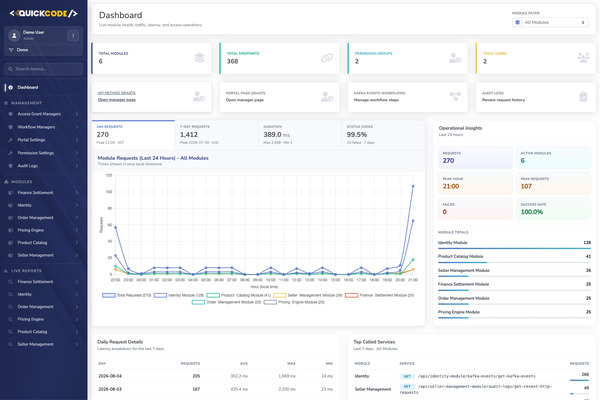
Explore a real project in QuickCode Studio, then try the live application it produced.
See how a real project is designed, structured, and managed.

See the generated product running — portal, APIs, and source together.
-
Try the live application
Browse the hosted admin portal for this stack
Demo sign-in
Demo sign-in Email[email protected]PasswordString1! - Inspect the generated code Full microservices repository on GitHub
- Explore the API docs Live gateway with Swagger / OpenAPI
Continuous Improvement
Analyze → Schema → Workflows → Generate → Deploy
Review the plan in QuickCode Studio, refine DBML and workflows, then ship and loop back anytime.


Describe the product, approve the BRD, then analyze
Start on the homepage or in QuickCode Studio with Project with AI. Describe what you want to build. QuickCode does not jump straight to schema — it first runs BRD discovery (a structured business requirements document you approve), then Project Analysis against that approved baseline: modules, architecture, open questions, and project context in a Versions · Plan · Chat workspace. Analysis chat uses Jev for typed intent routing. Every analysis version is saved so you can reopen, compare, and reanalyze when the brief changes.
BRD discovery first
AI drafts goals, actors, FR/NFR, assumptions, constraints, and out of scope. Discovery asks only the gaps that matter — with recommended answers and QuickCode defaults. You approve the BRD before architecture runs.
Project Analysis on the approved BRD
After approve, Analysis returns a reviewable module plan — custom GENERATED modules, PLATFORM catalog picks, and system Identity — grounded in the BRD snapshot, not a free-form chat dump.
Jev routes Analysis chat
Before a full model call, Jev classifies each chat turn as a typed decision — ask a question, change the plan, or generate DBML — so Studio stays fast and on-intent.
Open questions & notes
Answer only the gaps that would still change the schema or module map. Add notes for v1 constraints, then update the plan before you generate DBML.
Versioned analyses
Switch between saved analysis versions in the Versions rail to compare plans and continue from an earlier understanding of the product.
Workflow suggestions early
During analysis, AI proposes business workflows you may need later. You review the suggestions now; you write the workflows after DBML exists.


Ask Your Project anytime after the project exists
Once the project is created, use QuickCode AI next to DBML and ERD. Ask about the analysis, module contexts, architecture, data model, business rules, and APIs. Jev routes each turn as a typed decision so the right context is loaded before the answer model runs. Answers use your project, not generic chat. Clear schema or DSL requests apply straight to an unsaved draft — open the draft badge to review the line diff against the last saved version, then save when it looks right. Ask AI can also guide new workflows.
Jev typed routing
While routing runs, Studio shows a busy state such as Choosing where to look… Jev decides whether you are asking a question, requesting a schema change, or needing another Studio surface — then QuickCode loads only the slices that hop needs.
Grounded in analysis and context
Answers use Project Analysis, per-module contexts, architecture, DBML, DSL rules, and generated APIs when they exist.
Draft first, then save
Ask for a table, column, or DSL change: QuickCode applies it to the module draft without a separate confirm dock. The version badge shows [draft] until you save. Open it anytime to compare draft vs saved, including token usage when the change came from AI.
Workflow guidance
When a new business flow is needed, Ask AI can explain steps or adjust YAML for the selected workflow.


Generate DBML and DSL from the plan
When the analysis looks right, generate per-module DBML in the background, or edit schemas by hand in QuickCode Studio. AI drafts tables and relations; you refine columns, Refs, and QuickCode DSL. Every table gets automatic CRUD. Custom Query, Update, and Delete lines in table Notes become REST endpoints. DBML revisions are versioned like analyses.


Anthropic


OpenAI


Google Gemini


DeepSeek


Groq


NVIDIA
Query, Update, Delete in Notes
Query: filters, joins, reports, and existence checks. Update: named state changes. Delete: conditional or bulk deletes beyond delete-by-id CRUD.
Edit diagram or text
Work in the DBML editor or the ERD; they stay in sync. Restore earlier DBML drafts from revision history when an experiment goes the wrong way.


Write workflows and import external OpenAPI
Analysis already suggested the business flows. After DBML exists, open Workflows in QuickCode Studio: List · Editor · Ask for Kafka and endpoint workflows, plus an APIs tab to import third-party OpenAPI / Swagger JSON. Parsed operations and environments join the same catalog as your module APIs — wire them into flows with locked contracts, not free-form URLs.
Suggestions first, write later
You get workflow ideas on the analysis Workflows tab while the plan is forming. Creation and editing wait until the modules have DBML.
List, editor, and Ask AI
Pick a flow from the list, edit YAML or the diagram in the middle pane, and open Ask AI on the right for that workflow’s definition — not a blank chat.
External OpenAPI APIs
Under Workflows → APIs, import OpenAPI 3 JSON for payment, CRM, or other third parties. Specs are versioned, environments hold base URLs and secrets, and ops appear in the workflow catalog alongside your generated module endpoints.
Kafka and endpoint kinds
Event-based Kafka flows coordinate modules asynchronously. Endpoint workflows become callable API sequences when you generate.
Versioned workflows
Keep every revision so you can restore or compare after Ask AI or manual edits.


Choose stack per module, then generate
Generate production-ready microservices from the design. Choose stack per module — .NET, Java, Node.js, or Rust; Service or CQRS; SQL Server, MySQL, or PostgreSQL in the same solution. Gateway, Identity, Swagger, and an admin portal ship as source code you own. Change the design later and regenerate safely: custom code stays.
Per-module stack
One module .NET + CQRS + PostgreSQL; another Java + Service + SQL Server; mix Node.js or Rust where it fits. Mix what fits each bounded context.
Safe regeneration
Refresh the generated layer when schema or workflows change. Your custom code remains.
No vendor lock-in
Output is standard best-practice code you keep even if you leave QuickCode.


Push to GitHub and deploy on Cloud Run
Watch GitHub Actions and Cloud Run in QuickCode Studio as gateway, portal, and module APIs go live together. From describe to a running URL — generate, containerize, deploy, and observe.
End-to-end pipeline
Solution generation, migrations, Docker, registry, and Cloud Run — visible in Studio as the system comes up.
Gateway + modules together
APIs and portal go live as one deployable system, not a folder of sample code.
Microservices Architecture
Platform overview
The map mirrors a generated QuickCode system: entry at the top, core services in the middle, third-party integrations on the right, then event streaming and logging below.
- Entry: Admin User → Portal; Api User → API Gateway (YARP).
- Core services: Identity plus each module as Api | DB — no shared databases. Optional BFF orchestrates endpoint workflows across generated modules and external APIs.
- Third party: Module APIs call external services over a shared mid-gap trunk.
- Events & logging: Kafka workflows below Core; Elastic / Kibana for observability.
Microservice architecture
Portal, gateway, and identity sit above generated modules — each with its own API and database. Optional BFF orchestrates endpoint workflows across generated modules and external APIs.